- People & Payroll Perspectives
- Posts
- Payslips That Never Slip
Payslips That Never Slip
Because payroll shouldn’t come with follow-ups, delays, or “did you get it?” messages.

Kareena at NeoPeople
April 09, 2026
Missed me?
If you’re new here, I’m Kareena, and this is usually where I unpack the realities of work—especially the stuff no one’s really talking about—and what we can actually do to fix it.
But today, this one’s for the readers who scroll straight to the updates. Less theory, more action. Features that make NeoPeople faster, cleaner, and simpler from login to logout.
This week, we’re talking Payslips—but not the way you’re used to.
Let’s get into it.
Payslips aren’t optional. Every business issues them—cash, cheque, or transfer. We’ve reworked that experience to be clearer, more detailed, and far more transparent for your team.
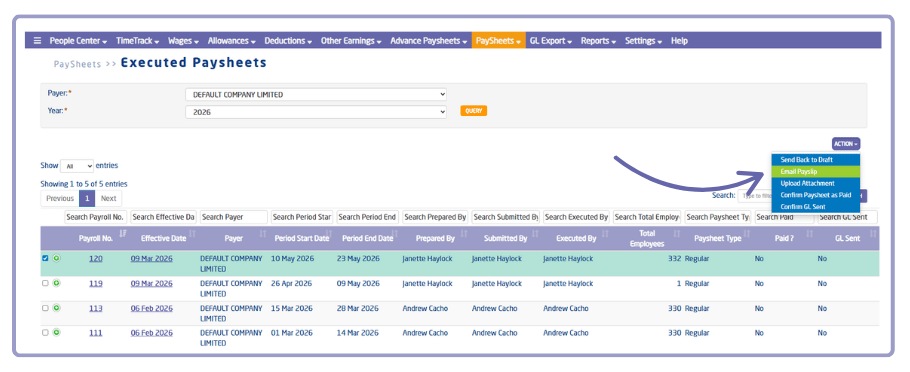
Sending Future Payslips
(Payroll > Paysheets > Executed Paysheets: Action > Email Payslips)
Clients can now automatically send future payslips straight from executed paysheets—quick, consistent, and one less thing to chase.
Note: With this update, payslips can only be sent for future executed paysheets, not past ones.

Now let’s take a look at your scheduled payslips—and where they stand.
(Payroll > Dashboard > Payslips Widget)

Click the arrow
In this view, teams can see the full trail of payslip activity in one place—what was sent, what’s scheduled, what failed, and what’s still sitting in the queue.

It also shows transmission history by employee, pay period, status, and attempts—so you can track what went out, catch issues quickly, and follow up when needed.
We’ve also included a Legacy tab for anyone who wants a clear view of past records and peace of mind that everything lines up.
Sending payslips is one thing. Knowing they actually got delivered? That’s covered.
Because work shouldn’t feel like guesswork.
When your team is at ease, so are you—fewer delays, less back-and-forth, and everything right where it should be.
More updates coming soon.
We’re rolling this out bit by bit, so if it’s not live for you yet, it’ll show up soon.
If you have any questions or need assistance, feel free to contact your account manager.
See you next time!
— Kareena from NeoPeople
P.S. I’d love your feedback. Take the poll below or reply to this email
How do you rate this month's product update?Feedback helps us improve! |